Billions of people rely on WhatsApp every day for everything from quick family catch-ups to sharing sensitive work files. Because the platform handles so much personal and corporate data, it naturally raises important questions about privacy, user safety, and who can monitor our messages.
Get Best Professional Help
To get the best remote phone monitoring service, Hire an expert professional hacker or investigator.
Understanding how WhatsApp monitoring works is essential—whether you’re a parent protecting your child, an IT admin securing company devices, or a security researcher evaluating app safety. However, finding reliable information online is notoriously hard. Searching for terms like “remote WhatsApp monitoring” mostly leads to scams, malware, and fake tools promising impossible zero-touch hacks.
This guide cuts through the marketing hype and technical confusion. Ahead, we explain how WhatsApp’s encryption actually works, look at legitimate device management tools, break down technical limits, cover key legal rules, and show you how to audit and protect your own account.
⚠️ Legal, Regulatory, and Ethical Disclaimer of Remote WhatsApp Monitoring
Accessing or monitoring an adult’s personal smartphone or WhatsApp account without their clear consent is illegal in most places. Doing so violates major laws, including the Computer Fraud and Abuse Act (CFAA) and wiretap laws in the US, the Computer Misuse Act in the UK, and the GDPR in the European Union.
Monitoring software and device management tools should strictly be deployed under authorized circumstances: by legal guardians managing devices used by minor children, or by enterprise organizations managing company-owned assets where employees have signed explicit monitoring disclosures and acceptable use policies. Proceeding without legal authorization exposes individuals to severe legal liabilities and civil lawsuits.
Part 1️⃣: How WhatsApp Security and Encryption Work
To understand if remote monitoring is actually possible, you first need to look at the security protocols that protect WhatsApp messages.
1⃣ The Signal Protocol and End-to-End Encryption (E2EE)
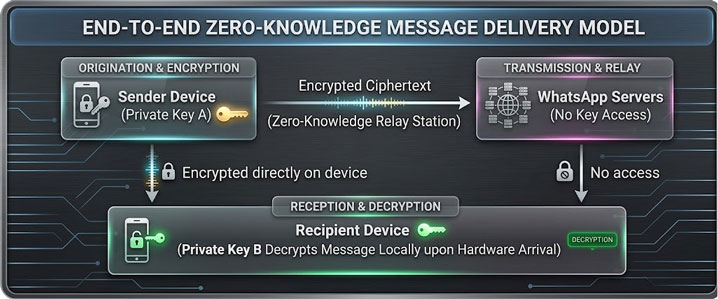
WhatsApp uses a customized version of the open-source Signal Protocol to automatically encrypt everything you send—including text messages, voice notes, photos, videos, files, and calls.
How it works step-by-step:
- Public and Private Keys: When you set up WhatsApp, your phone creates two keys: a “public key” sent to WhatsApp’s servers and a “private key” saved securely on your phone.
- Creating a One-Time Key: When you send a message, your phone and the recipient’s phone automatically create a temporary, unique code to lock that specific conversation.
- Scrambling on Your Device: Your message is scrambled into unreadable code directly on your phone before it ever goes out over the internet.
- Passing Through WhatsApp: The scrambled message travels through WhatsApp’s servers. Because WhatsApp doesn’t have your private key, it acts only as a delivery driver—it cannot read or unlock your message.
- Unlocking on the Receiver’s Phone: Once the scrambled message reaches the recipient’s phone, their private key decrypts it back into readable text.
2⃣ The Myth of “Remote Hacking via Phone Number”
Because WhatsApp never stores your private encryption keys, there is no tool or database on the internet that can hack an account using just a phone number.
Websites that claim they can instantly hack WhatsApp online are scams or malware. They usually fall into three categories:
- Survey Scams: Fake portals that trick you into completing endless ad surveys or signing up for paid subscriptions while giving you nothing in return.
- Phishing Sites: Websites designed to steal your Google, Apple, or banking logins while claiming to run a “background scan.”
- Malware Downloads: Sites that prompt you to download a file or browser extension, which then infects your own device with viruses, keyloggers, or ransomware.
Real monitoring tools never break WhatsApp’s encryption through the cloud. Instead, legitimate management software must run directly on the device itself—capturing text only after the phone has already unlocked the message.
Part 2️⃣: How Legitimate Monitoring Actually Works
When parents or companies use legitimate tools to monitor devices, they rely on three main methods. These approaches vary widely in how they work, what features they offer, how visible they are to the user, and what laws apply.
Method ❶: Dedicated Parental Control & Endpoint Management Platforms
Installing monitoring software directly on a device is the standard way parents protect children and companies secure work phones. These tools work by running a small background app on the target phone (Android or iOS).
-
𝟙. How the Technology Works Step-by-Step
- Device App Installation: A monitoring app is installed on the phone. On Android, it uses system permissions like Accessibility and Notification Access. On iOS, it uses Mobile Device Management (MDM) profiles or system backups.
- Local Capture: Right after WhatsApp receives and unlocks a message, the app records it using screen grabs, notification logs, or keyloggers.
- Secure Upload: The recorded messages, call details, and photos are encrypted and sent securely over the internet to an admin dashboard.
- Dashboard Review: The account owner logs into a web panel from any browser to view chats, call history, and contacts.
-
𝟚. Types of Commercial Monitoring Tools
While many commercial options exist, they generally fall into a few key technical categories:
Tool Category Technical Focus Core Features Operational Notes Anonymous Hacking Marketplace (e.g., Hackerslist.co) Hire expert professional hackers The largest anonymous and free marketplace for hacking. Hire expert professional hackers, phone hacker, facebook hacker, whatsapp hacker, instagram hack, snapchat hacker, hack university grades, credit score hack, hire a phone spy on someone’s whatsapp remotely. Remotely monitoring Agents (e.g., Spouseware™Cears) Remotely monitoring packages Whatsapp, phone, data, calls, messages & GPS location. Spy your loved ones photos, emails & associates social medias. Also widely recognized for child safety, providing real-time text logging, timestamp tracking, and media file viewing. Exp: Facebook, Instagram, Whatsapp, Line, Snapchat, Wechat, Tiktok etc. Screen-Capture Agents (e.g., Eyezy) Screen-buffer monitoring Automated screenshots whenever WhatsApp is actively open Captures disappearing messages before expiration; moderate battery usage. System Integrators (e.g., uMobix) OS-level hooks & keylogging Keystroke capture, contact synchronization, notification indexing Deep integration on Android OS; requires extensive system permissions during setup. Advanced Extraction Solutions (e.g., FlexiSPY) System logs & audio stream access Full file system access, media extraction, ambient audio Advanced technical deployment; requires elevated system privileges on target hardware.
Method ❷: Meta’s Native “Linked Devices” Feature
Meta provides a built-in multi-device feature called Linked Devices (formerly WhatsApp Web). This allows users to access and sync their WhatsApp account across multiple screens.

-
① How Linked Devices Work
WhatsApp lets you connect up to four extra devices—such as laptops, desktop apps, or tablets—to a single primary account. Each connected device links directly to WhatsApp’s servers with its own end-to-end encryption key.
-
② How to Link a Device Step-by-Step
- Open WhatsApp Web: On your computer or secondary device, open a web browser and go to
web.whatsapp.com. - Unlock the Primary Phone: Open and unlock the main smartphone.
- Open Linked Devices: In WhatsApp, go to Settings (iOS) or tap the Three Dots Menu (Android), then tap Linked Devices > Link a Device.
- Scan the Code: Point the phone’s camera at the computer screen to scan the QR code.
- Sync Your Data: The browser will automatically download recent chats, contacts, media, and incoming messages in real time.
- Open WhatsApp Web: On your computer or secondary device, open a web browser and go to
-
③ Built-In Limitations and Security Alerts
Linked Devices is free and easy to set up, but WhatsApp includes security features that make secret monitoring nearly impossible:
- System Notifications: The main phone shows a constant pop-up notification whenever a linked web session is active or syncing data.
- Easy Session Tracking: The main user can open the “Linked Devices” menu at any time to see every connected browser, operating system, approximate location, and last active time.
- Automatic Logout: If the primary phone stays inactive or offline for 14 days, all linked web sessions automatically log out.
Method ❸: Cloud Database Backup Restoration
Another way to view past WhatsApp conversations is by restoring chat backups saved to cloud storage (Google Drive for Android or iCloud for iOS).
-
𝟙. How Cloud Backup Extraction Works
WhatsApp regularly backs up your chats and media to your cloud account. If an admin has full access to both the target phone number and the associated Google or Apple account, they can restore those chats:
- Install WhatsApp: Download WhatsApp onto a secondary phone or tablet.
- Enter the Phone Number: Enter the target user’s phone number during setup.
- Enter the Verification Code: Enter the 6-digit SMS code sent to the target’s primary phone.
- Find the Cloud Backup: WhatsApp searches Google Drive or iCloud for the most recent chat backup.
- Restore the Chats: The app downloads and restores past messages and media onto the new device.
-
𝟚. Why Cloud Restoration Fails for Covert Monitoring
- Instant Account Disconnection: WhatsApp only allows one active smartphone per phone number. Registering the number on a new phone immediately logs the target user out on their device, instantly alerting them.
- Encrypted Backups (E2EE Backups): If the account owner turned on Encrypted Backups, the cloud file is locked with a custom 6-digit PIN or a 64-digit security key. Without that specific password, the backed-up chats cannot be read—even with access to the SMS code and cloud account.
Part 3️⃣: Legitimate Use Cases and Governance
Knowing the difference between illegal intrusion and authorized oversight is essential for managing risk, maintaining workplace governance, and protecting children online.
-
1҉. Parental Supervision and Child Safety
Children are going online at younger ages, exposing them to risks like cyberbullying, predatory behavior, online grooming, harmful content, and dangerous internet challenges.
Best Practice: Pair monitoring software with open communication. Explain to your child why the software is on their phone, set clear rules together, and regularly review safety settings as a team to build trust while keeping them safe.
-
2҉. Corporate Governance and Endpoint Compliance
Companies routinely issue mobile devices to employees for work. Unmonitored devices create serious risks, including data leaks, lost intellectual property, corporate espionage, and regulatory penalties under laws like GDPR or FINRA.
Best Practice: Implement clear Acceptable Use Policies (AUP) and Mobile Device Management (MDM) solutions. Require employees to sign explicit consent forms acknowledging that company-owned devices are logged, archived, and monitored.
Part 4️⃣: Practical Security Guide: Protecting Your WhatsApp Account
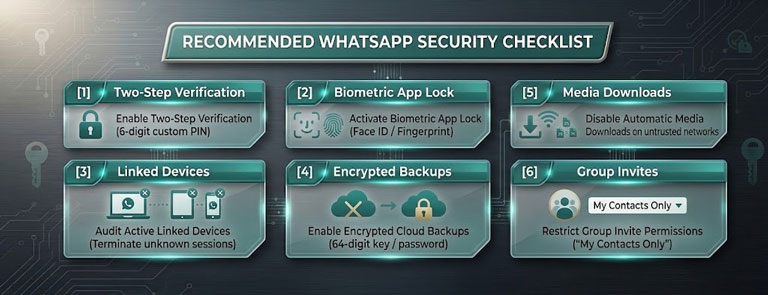
Whether you want to prevent unauthorized secondary devices, background spyware, or account hijacking, taking a proactive approach is key. Follow this step-by-step security checklist to protect your privacy:
-
1̷. Enable Two-Step Verification (2FA)
Two-Step Verification adds an additional layer of cryptographic protection to your phone number registration process. Even if an attacker manages to intercept your 6-digit SMS verification code (via SIM-swapping or physical access), they cannot complete account setup without your secondary PIN.
Setup Path: Navigate to Settings > Account > Two-Step Verification > Enable. Create a memorized 6-digit PIN and supply a secure recovery email address.
-
2̷. Audit Active Linked Sessions Frequently
Regularly inspect which external web browsers or desktop apps have access to your account stream.
Audit Path: Navigate to Settings > Linked Devices. Review the list of active browsers and operating systems. If you see an unfamiliar session, tap the device entry and select Log Out immediately. This instantly severs the connection and revokes E2EE session keys for that browser.
-
3̷. Implement Biometric Application Locking
Prevent unauthorized physical access to your messaging chats when your phone is left unlocked on a desk or table.
Setup Path: Navigate to Settings > Privacy > App Lock (or Screen Lock). Toggle on Require Face ID / Touch ID / Fingerprint. Set the re-lock timer to Immediately.
-
4̷. Secure Cloud Backups with End-to-End Encryption
Ensure your chat archives stored on Google Drive or iCloud cannot be read by cloud service providers or accessed via compromised account passwords.
Setup Path: Navigate to Settings > Chats > Chat Backup > End-to-End Encrypted Backup. Select Turn On and follow the prompts to create a unique password or generate a 64-digit encryption key. Store this key in a secure password manager.
-
5̷. Protect Against Device-Level Spyware
To prevent background tracking tools from logging your screen or keystrokes:
- Keep your phone’s operating system (iOS or Android) updated to the latest security patch.
- Never jailbreak an iPhone or root an Android device, as this disables core sandbox security protections.
- Avoid installing third-party APK files or applications from untrusted sources outside the official Google Play Store or Apple App Store.
- Run periodic device scans using reputable endpoint mobile security software to detect malicious accessibility service bindings.
The Conclusion
Remote WhatsApp monitoring sits at the intersection of encryption, device security, privacy laws, and ethics.
While scam websites offer the illusion of “one-click remote phone hacking,” actual cybersecurity is simple: WhatsApp’s encryption robustly protects your messages while they travel across the internet.
Real, legitimate monitoring only happens through mobile number to the device or authorized administrative tools, or official features like device linking. Whether managing phone safety for children or employees, always stay within legal boundaries, prioritize open communication, and protect your own account using built-in security tools like Two-Step Verification and biometric locks.